 Open Historia
AI Providers and Models
Which providers work, which models to pick, what it costs, and the expert controls.
Connecting an AI provider covers getting set up. This page is about choosing well: which provider, which model, what it costs, and what the expert controls do.
What the game asks of a model
This matters more than raw benchmark scores. Open Historia does not just ask for prose — it asks the model to return strictly structured data describing territory transfers, unit operations, country changes, structures and diplomatic openings, alongside the narrative, and to keep them consistent with each other.
A model that writes beautifully but cannot reliably produce valid structured output will give you turns that fall back to canned events. A smaller model that follows instructions precisely often outperforms a larger, chattier one.
That is the main axis to judge on: instruction-following and structured output, then writing quality, then speed.
Choosing a provider
| Provider | Cost | Works in the browser build | Good for |
|---|---|---|---|
| Gemini | Free tier | Yes | Getting started, and most people's permanent answer |
| Anthropic | Pay per token | Yes | Richest diplomacy and narrative |
| OpenAI | Pay per token | Desktop only | Strong all-round |
| OpenAI Compatible | Varies | Depends on the service | Local models, DeepSeek, Groq, OpenRouter, everything else |
| Anthropic Compatible | Varies | Depends | A self-hosted Anthropic-protocol proxy |
"Works in the browser build" is about whether the provider allows direct requests from a web page. The desktop and self-hosted builds relay around this automatically; the hosted website cannot. See connecting an AI provider.
Defaults
| Provider | Default |
|---|---|
| Gemini | gemini-3.5-flash-lite, with gemini-3.1-flash-lite as its backup |
| Anthropic | claude-haiku-4-5 |
| OpenAI | gpt-5.6-luna |
| OpenAI Compatible | no model set — the game picks a chat model from the server's own list |
The defaults are the cheap, fast tier of each family. They are a genuinely reasonable place to start, not placeholders.
Trading up
Moving from a fast model to a strong one changes the game noticeably. Where you will see it:
- Diplomacy. Leaders that stay in character, remember, and negotiate rather than agree.
- Long jumps. Compressing six months into a coherent set of events is hard.
- The advisor. The most reasoning-heavy thing in the game.
- Consistency. Whether turn twelve remembers what turn four established.
Where you will not see much: short jumps in a quiet period, and anything mechanical.
A reasonable pattern is to play on a cheap model and switch to a stronger one when something important is happening. Per-task models does this for you: the time skip on a strong model, small jobs on a cheap one.
Costs
A time skip is one request where it can be, two when there is something to check afterwards, and never more than three — that is what Save AI requests (on by default) guarantees. Turn it off and every check after a skip makes its own request, the model may look things up, and a busy skip can use twenty or more. Diplomacy, the advisor and Background AI (countries writing to you unprompted, forces repositioning, extra agent reports — capped at 30 a day by default) cost extra on top. Settings → AI → AI requests shows today's count and what your last skip used.
Rough guidance rather than a price list:
- Gemini free tier genuinely covers solo play. Watch the rate limits on the larger models — hitting one mid-jump stalls the turn. A backup model takes over when one runs out.
- Cheap tiers (Haiku, Flash, DeepSeek) run a campaign for small change.
- Frontier models are noticeably better and noticeably more expensive per turn. Long jumps cost more than short ones because there is more to write.
- Local models cost nothing and run offline.
If you are watching spend, leave Save AI requests on, turn Background AI off or lower its cap, and use the advisor less. Task prompts open with a fixed prefix that providers cache, so a large share of each time-skip prompt is billed at the cheaper cached rate where the provider offers one.
Local models
Free, private, offline. Setup is in connecting an AI provider.
Be realistic about size. Models around 3B and below frequently fail to produce valid structured output, and you will see turns fall back to canned events. 7–14B instruct models are a sensible floor. Larger is better if your hardware allows it.
If your hardware does not, the Gemini free tier will give you a better game than a very small local model.
Expert controls
You do not need any of these to play.
Model reasoning enables extended thinking on models that support it. Slower and more expensive per call; better on complex turns. Worth turning on for a frontier model, pointless on a small one.
Strict tool schema changes how structured output is requested from OpenAI-compatible endpoints. Some gateways and local servers handle the strict form badly. If turns keep failing to parse, toggle this — it is the single most useful switch for a misbehaving compatible endpoint.
Custom parameters (JSON) are merged into the request body, so you can set anything the provider accepts — temperature, sampling, provider-specific options. Malformed JSON is ignored rather than breaking the game.
Limit AI generation abandons a stalled generation and falls back to a canned event. It measures silence rather than elapsed time. Recommended with local models.
Custom parameters and Strict tool schema are set on a connection; an entry in the Models list can have custom parameters of its own and How the AI answers, which picks the structured-output method to try first. See adding backups.
On beta the game sets a temperature per task. Tasks that match or classify — placing a name on a region, choosing the next speaker — are asked at 0.1; the ones that reconcile or summarise at 0.2; stat sheets and intelligence readings at 0.3. Anything written to be read in character (time skips, diplomacy, the advisor) is left at the provider's default. A temperature in your own custom parameters still wins, and a model that refuses one (an OpenAI reasoning model, say) is remembered and asked without it.
Seeing what the AI did
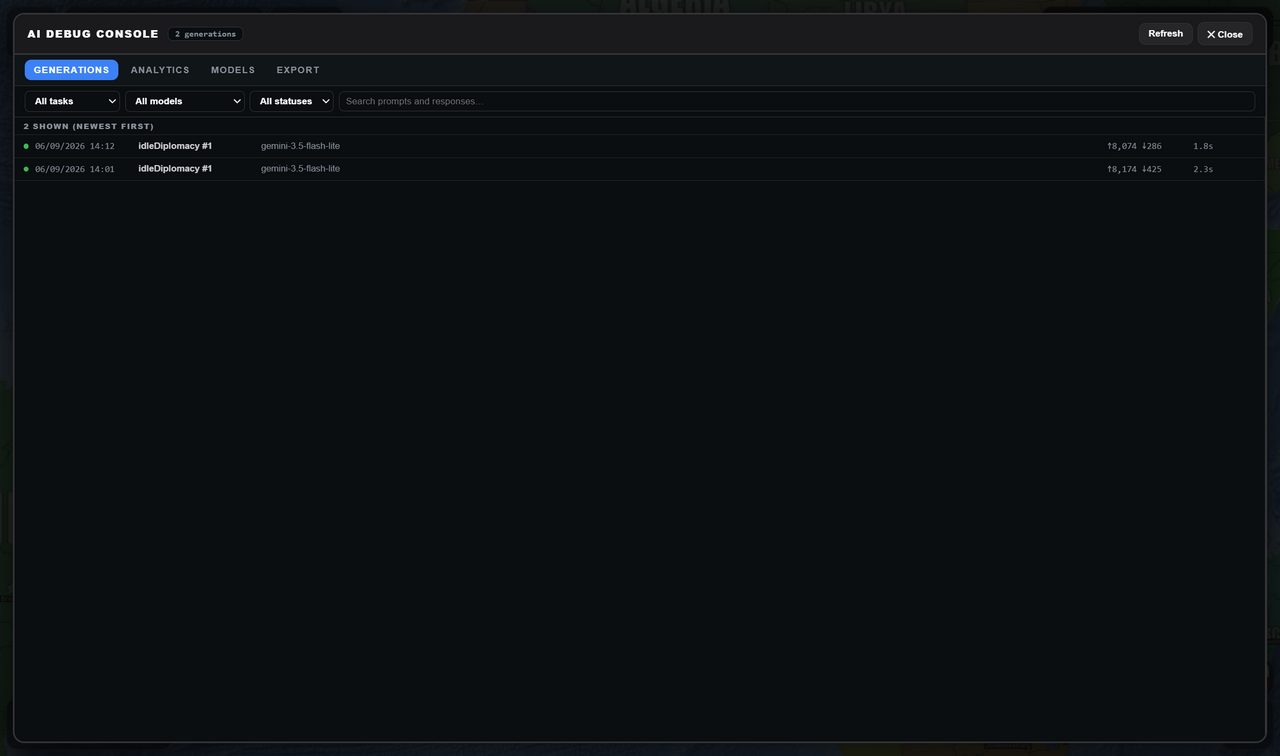 The debug console: every call with its task, model, token counts and latency. These two are idleDiplomacy firing on its own.
The AI debug console (☰ → Tools) shows every call with its full prompt, answer, model, token counts, latency and validation verdict, with analytics per task and model and a JSON or CSV export. It keeps the last 200 calls across sessions while Record AI telemetry is on.
If you care about cost control, about a game that keeps going when a free allowance runs out, or about seeing what the game actually sends, that — with backup models and per-task models — is where to look.
Next
- Connecting an AI provider — the setup steps.
- Troubleshooting — when it will not connect.
- Settings — where all of this lives.
Open Historia is under active development on two channels, and this
wiki is written by hand — a page can fall behind a release. Last checked against the game on 2026-09-24 · main e62a1c55 · beta 2f48a6c2. If something
here does not match what you see in the game, trust the game and
say so on Discord.