 Open Historia
Troubleshooting
Blank maps, greyed-out AI, slow turns, CORS errors and the other things that go wrong.
The common failures, and what actually fixes them.
Before anything else: ☰ → Settings → Advanced → Diagnostics holds the game's log — what you did, and every error and API failure along the way. 🔎 View log reads it in place. It usually explains the problem immediately, and it is what to attach to a bug report.
The map is blank
In the browser. The web build streams its map from community-run content nodes. If none is reachable you get no map. Reload; if it persists, the node network is having a bad day — try again later, or use the desktop app, which stores the map locally.
On desktop. The map data failed to download on first launch. It is about 200 MB fetched
separately from the installer. Restart the app and let the startup screen finish. From a source
checkout, run node scripts/fetch-map-assets.mjs.
A full-screen WebGL warning. The map cannot render without WebGL. Update your graphics drivers; in a browser, check that hardware acceleration is enabled. On a virtual machine or over remote desktop, WebGL is often unavailable.
The AI is greyed out or does nothing
Work through these in order:
- Is a provider configured? ☰ → Settings → AI. No key, no world. Look at the Models
list: an entry reading Unusable says what is wrong with it, such as
key rejected (401)ormodel not found (404). Fix it and the mark clears. - Is the key right? Paste it fresh; keys often pick up whitespace.
- Is the model name right? A model you type must exist on that provider. Left blank, OpenAI
uses
gpt-5.6-lunaand OpenAI Compatible picks one from the server's list. - Is the endpoint right? Compatible providers need the base URL, usually ending
/v1. An address that points at the service's website rather than its API gets a web page back instead of an answer. The error quotes a line of that page and tells you to check the address, which should start withhttps://and usually end in/v1. - Are you in the browser build with a provider that needs a relay? The hosted website cannot relay. Gemini and Anthropic work there; OpenAI and most compatible endpoints do not. Use the desktop app. See connecting an AI provider.
Turns fail, or always fall back to canned events
This is almost always the model failing to produce valid structured output.
- Your model is too small. Below about 7B this is common. See AI providers and models.
- Its context window is too small. A turn's prompt is large, and a model limited to a few thousand tokens cannot take it. A turn needs 32k tokens or more, and 128k is comfortable. The error says the context window was exceeded and how big the request was. Once a model has said how big its window is, the game remembers and does not send it a request that cannot fit: the call goes to the next model in the list instead, or, if none can take it, is not sent at all and says so.
- Toggle Strict tool schema (on the connection, in Settings → AI). Some gateways and local servers handle the strict form of structured output badly, and flipping this fixes it outright.
- Try a different model on the same provider. Some are far better at this than others.
- Check the diagnostics log — it will show you what came back.
Turns hang forever
Turn on Limit AI generation (Settings → AI). It abandons a generation that has gone silent and falls back rather than waiting indefinitely. It watches for silence rather than total time, so it will not cut off a slow-but-working model.
Then: Cancel in the time panel always works and leaves the world untouched.
If it is a local model, it may genuinely be that slow — check whether it is producing tokens at all. If it is a cloud model, you may be rate limited.
When a request fails
Model calls fail: a provider is overloaded, a rate limit bites, a response comes back empty. The game's answer is that a failure should cost you the thing that failed, and nothing else.
The advisor
A failed answer appears as an error in the thread with a Retry button. Press it and the same question is asked again — you do not retype anything, and if it succeeds the thread reads as though the error never happened.
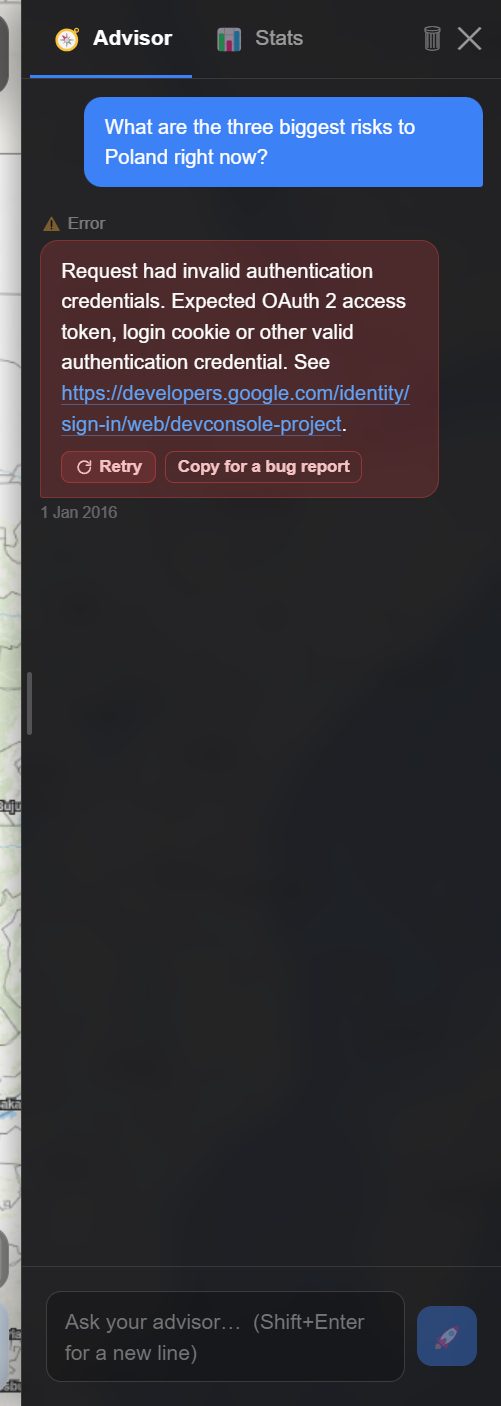 Your question is kept above the error, so Retry re-asks it as written. The button beside it is
💾 Save logging file while the diagnostics log is on, and Copy for a bug report when it is
off — see reporting a bug.
Your question is kept above the error, so Retry re-asks it as written. The button beside it is
💾 Save logging file while the diagnostics log is on, and Copy for a bug report when it is
off — see reporting a bug.
Retry is offered on the newest error only. Most advisor failures are the transport or an overloaded provider rather than anything about your question, and the transport has already waited and tried once by the time you see this.
Diplomatic messages
The same, in the chat. A message that fails to get a reply shows an error bubble with Retry on it. Pressing it re-sends that message; the conversation carries on as if it had worked first time.
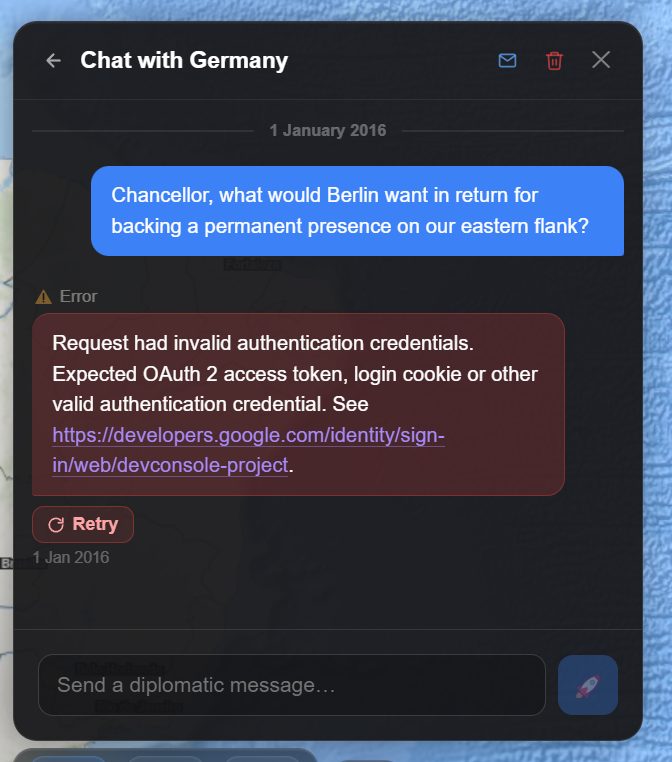 The message you sent stays in the thread. Retry asks Berlin again; nothing needs retyping.
A held time skip
This is the one that saves real time. When a long skip is generated in segments and one segment does not come back, the turn is held, not failed:
- Nothing has been written. Your campaign is still on its old date.
- The segments that already succeeded are still in hand.
- Retry re-runs only the segment that failed — the minutes spent on the earlier ones are not spent again.
The panel goes amber rather than red for exactly that reason: a held turn is recoverable. If a retry fails it says so plainly and counts the attempts, rather than re-showing the same message and looking like a dead button. Discard the turn and run it as a shorter skip if it keeps failing. See time and turns.
A held Projects board
The turn's events can succeed while the Projects & Operations update fails. When that happens the turn is held the same way: "Your events are ready, but the Projects & Operations board did not update, so nothing has been saved yet." (With Save AI requests on, the board is one of the checks that share the after-skip request.)
Retry the board and it finishes the turn, keeping the events that already came back. You do not re-run the whole simulation to fix a board that was the only thing to fail. Discard it and the turn runs again from the start.
The turn is released before the retry runs, so a turn can never be applied twice, and it is only held again if the board fails a second time.
If retrying does not help
Undo the turn from the time panel and try a shorter skip, or a different model.
Every model has used its allowance
"Every model in your Fallback list has used its allowance for now. The first back is …, at …"
No entry in Settings → AI → Models can answer: each one is Spent or Unusable, and at least one is Spent. The time skip did not start, rather than fall back to canned events. Either wait until the time shown, or add a backup — a paid key or a local model — and play on now. If you know a model is back sooner, for example because you just topped up billing, press Reset on its entry.
If instead it says "No model in your Fallback list can answer", nothing is coming back on its own: an entry is Unusable, and the message names it and what is wrong. See backup models.
The writing suddenly changed
A notice near the top of the screen says when the game moves to a backup model, and why: "… has used today's allowance. Now using …". A different model writes differently. Settings → AI shows which entries are Spent and when each comes back.
Rate limits
Symptoms: turns fail intermittently, or stall on long jumps while short ones work.
Free tiers have per-minute limits that a long jump can exceed, and a daily allowance that a busy session can. Options: leave Save AI requests on (a skip then costs one to three requests), use the smaller/faster model in the family (limits are usually more generous), add a backup model, or move to a paid tier.
A rate limit is not the same as a Spent allowance. By default the game hands the call straight to the next model in your list, and the next call starts at the top again, since a per-minute limit is usually over by then. Settings → AI → When a model is rate limited → Wait, then try it again waits it out on the same model instead: slower, but it keeps your backups' allowance.
A busy provider is named as busy. When a provider refuses because it is overloaded — even partway through an answer — the game says so rather than treating it as a model that answered with nothing: "… is overloaded right now. Nothing is wrong with your game, your model or your message." It retries once after five seconds; still busy, that model sits out for ten minutes and the next one in your list takes over.
CORS errors with a local model
The error will name a blocked cross-origin request.
- Ollama — usually works as-is at
http://localhost:11434/v1. - LM Studio — make sure the local server is actually started, and check whether it has a CORS setting to enable.
- llama.cpp —
llama-servermay need to be started with CORS permitted. - Use the desktop app, which relays around this automatically. The hosted website cannot.
- Check
httpvshttpsand that the port matches.
Everything is slow
- Turn off 3D Terrain. It is by far the most expensive thing in the game.
- Turn off the 3D Globe.
- Turn on Reduce motion.
- Turn on Hide country labels.
- Zoom out, or switch to a lighter basemap such as Light Gray Canvas.
- On the desktop app, close and reopen it — a long session accumulates map tiles.
I lost my games
In the browser — clearing site data clears your campaigns. There is no server-side copy unless you signed in, which syncs them. Grant persistent storage permission when asked.
On desktop — saves are files in the app's data directory and are still there. If the library looks empty, the app may be pointed at a different data directory.
After installing the beta — the beta build keeps a separate library by design. Your stable campaigns are untouched; they are just not visible from the beta app. Open the stable app and they are there.
A country is behaving incoherently
The world drifted. Fix it rather than restarting:
- Undo the turn in the time panel and try different orders.
- Roll Back Turn in cheats, to go back further.
- GM Console in cheats — describe what should be true, preview exactly what it will change, and apply it.
- Simulation Reminders in cheats — a standing fact every AI is told until you withdraw it.
- Country Editor or the Event Editor, to correct a specific fact.
See cheats and the GM console. Using these is normal; an AI-driven world occasionally produces nonsense, and repairing it is part of running a long campaign.
Windows says the installer is unsafe
The installer is not code-signed yet. Choose More info → Run anyway in SmartScreen.
macOS will not open the app
Also not code-signed. Right-click the app and choose Open, then confirm. Once only.
Reporting a bug
Turn on detailed logging first — ☰ → Settings → Advanced → Diagnostics — then reproduce the problem. It records far more than the normal log, including the full text of the exchange that went wrong, and it is usually the difference between a report someone can act on and one that cannot be diagnosed. See the settings reference.
Then 💾 Save log file (or 💾 Save log file + game, which attaches the campaign it happened in) and open an issue at GitHub. The Discord is faster for "is this just me?".
The failure itself hands you the file, too. A turn that fell back to canned events, a failed advisor reply and a board update the advisor could not apply each have a 💾 Save logging file button. It saves the whole diagnostics log as a file, with that failure's details — for a turn, the model's raw response in full — in a Reported problem block at the top. Attach the file. With the diagnostics log turned off there is no log to save, so the button copies the one failure instead, under its old label (Copy debugging message or Copy for a bug report). The Android app cannot save files, so there it copies the whole log and says so.
On beta the Android app saves files too, through Android's share sheet, so the log and the game can be attached there as well.
Include your platform, your build (stable or beta), your provider and model, and what you were doing.
Open Historia is under active development on two channels, and this
wiki is written by hand — a page can fall behind a release. Last checked against the game on 2026-09-24 · main e62a1c55 · beta 2f48a6c2. If something
here does not match what you see in the game, trust the game and
say so on Discord.