 Open Historia
Cheats and the Game Master Console
Seventeen tools for rewriting the world by hand — the GM console, standing reminders, events, territory, countries and forces.
The Cheats panel is the game master's toolbox: seventeen tools for reaching into the world and changing it by hand — including direct control of forces, which lives here rather than in the normal interface.
Calling it "cheats" undersells it. Most of these are how you keep a long campaign on the rails when the simulation drifts, or how you author a world deliberately.
Open it from the game menu: ☰ → Tools → Cheats.
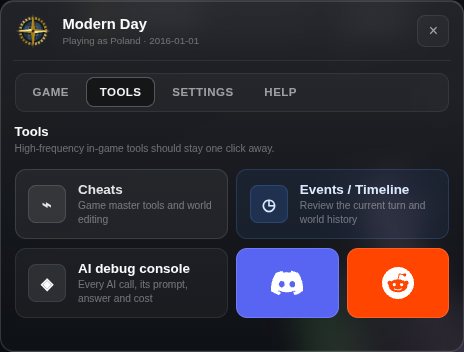 Cheats, the events timeline and the AI debug console, one click from the game menu.
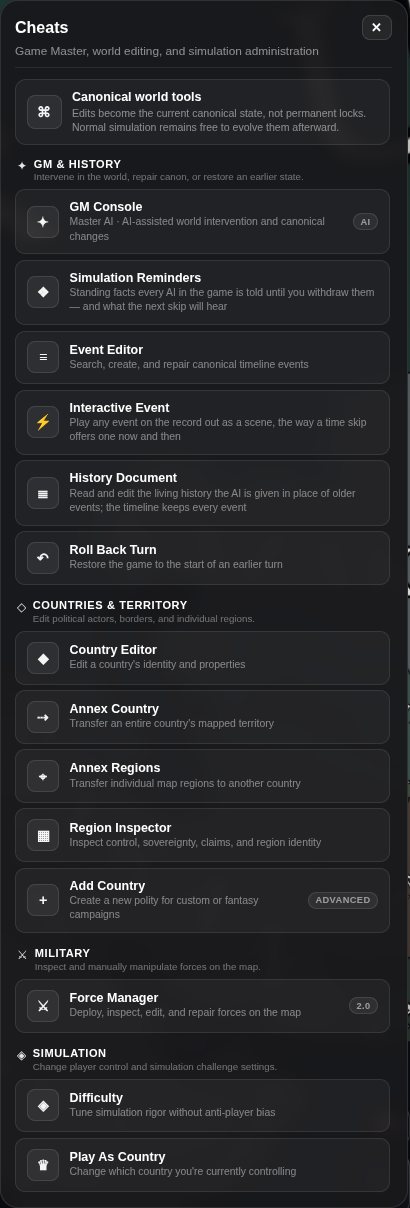 The tools, grouped: GM & History, Countries & Territory, Military, Simulation and Map. The GM Console is the one to reach for first.
GM Console
The most useful tool on the list. Describe a change in plain English and the AI plans it as a structured transaction — territory, countries, units, structures, wars, relations, agreements, storylines — and every operation is previewed before anything happens. Apply commits exactly that preview, with an audit record, and rolls back if the write fails. A change that would not land is refused with the reason, rather than quietly doing nothing.
"Hungary leaves the alliance and signs a non-aggression pact with Serbia. Their relationship with Vienna sours."
It works because it goes through the same machinery events do, so whatever it does is a legitimate world state rather than a hand-edited file.
Use it when something has gone wrong that no single tool fixes, or when you want to steer the narrative rather than wait for the simulation to get there.
The next skip is told
Every change made with these tools — a country annexed, a border redrawn, figures set by hand, an event written, the history document rewritten, a turn rolled back — is recorded as one line, and the next time skip opens with them: changes made outside the simulation since your last turn. They are canon, acts of authority rather than events, not to be undone or written up again. The advisor's catch-up note carries them too. None of it costs a request.
Simulation Reminders
Standing facts every AI in the game is told until you withdraw them — "the Kerch bridge is down". A short, dated list; every prompt that writes the world or speaks for a country ends with it, the advisor and every leader included. Edit or withdraw one here; withdrawing one is itself a change, so the next skip is told the fact no longer holds. Every AI sees every reminder, so a secret does not belong here.
Turn and campaign control
Roll Back Turn restores the world to the start of any earlier turn, discarding everything after it. Broader than the Undo in the time panel, which only steps back one turn at a time.
Play As Country switches which country you play. You can hand yourself a different nation mid-campaign, or follow a war from the other side.
Territory
Annex Country — click a country on the map and all of its regions fold into a target.
Annex Regions — click regions one at a time to transfer them individually.
Both enter a click-capture mode: map clicks go to the tool instead of opening the usual popups, and the panel gets out of the way until you are done.
Region Inspector shows any region's controller, sovereign and claimants, and how each came to be — and lets you edit control and make legal transfers. See territory.
Countries
Country Editor opens a country's identity: name, colour, tags, reputation, and its persistent stat sheet. Useful when the simulation has drifted a country somewhere you do not want it, or when you want to write a country's character deliberately.
Add Country creates a new one from nothing.
Both work on any country, not just yours. See countries and identity.
Map features
Map Feature Editor and Add Map Feature work on cities and structures — position, name, population, kind, owner, status. Place cities, HQs, landmarks, ports and other features.
Clear Map Features removes accumulated markers that have stopped mattering. Long campaigns build up a lot of them.
Adding your first custom city to a scenario switches it to carrying its own city list rather than the stock one.
Events and history
The Event Editor searches, creates, edits and deletes canonical events. An event you write can quote people, carry metadata, and optionally draw an NPC reaction after a 12-second undo window.
This is the tool for repairing history. If a turn produced an event that contradicts everything before it, you can rewrite it rather than rolling back and re-rolling the whole turn. You can also author events outright, which is how you run a scripted campaign.
Because events carry the world changes, editing one is editing history in both senses.
Interactive Event plays any event on the record out as a scene, the way a time skip offers one now and then. See interactive events.
History Document is the living account of the campaign the AI is shown in place of older events. Read it, and edit it — anything you write there is what the next skip believes about the past. The timeline itself keeps every event. See what the world remembers.
Forces
Force Manager opens the Forces panel: deploy, inspect, edit and repair forces on the map — type, strength and composition. See military and combat.
It is filed here deliberately. In normal play you order a military outcome and the world carries it out; placing divisions by hand is a game-master act.
Difficulty
Difficulty changes the level after the fact. See starting a game for what each level does.
Should you use any of this?
Yes. This is a single-player game with no score and nobody to cheat against. The tools exist because an AI-driven world sometimes produces something incoherent, and the alternative to fixing it is abandoning the campaign.
The one habit worth keeping: prefer the GM console over the direct editors where both would work. Describing what happened produces a world that hangs together, including the knock-on consequences. Hand-editing a border produces a border that moved for no reason anyone in the world can remember.
Next
- Events and history — what you are editing.
- Saves and rollback — the safer undo.
- The map editor — for changing the world itself rather than a campaign.
Open Historia is under active development on two channels, and this
wiki is written by hand — a page can fall behind a release. Last checked against the game on 2026-09-24 · main e62a1c55 · beta 2f48a6c2. If something
here does not match what you see in the game, trust the game and
say so on Discord.