 Open Historia
Starting a Game
Scenarios, choosing a country, inventing your own faction, and what the six difficulty levels actually change.
A new game needs three things: a scenario to play on, a country to play as, and a difficulty.
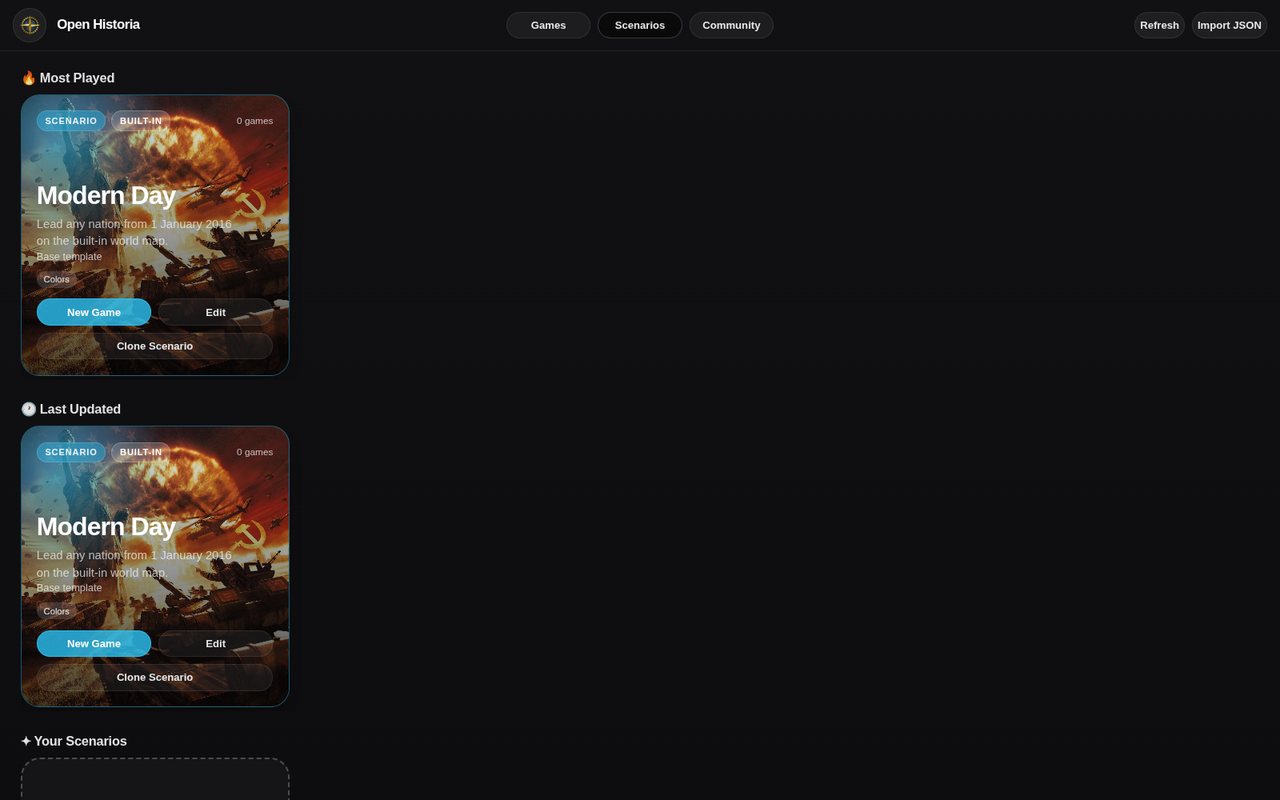 The Scenarios tab. Modern Day is the only built-in one; everything else comes from the Community Hub.
Scenarios
A scenario is a world — its map, its borders, who owns what, the starting date, which troop types exist, and any house rules the author wrote. A game is one playthrough of a scenario. One scenario can seed as many games as you like, and playing one never changes it.
Modern Day is the only scenario built into the game. Everything else lives on the Community Hub, including the official presets:
| Scenario | Start |
|---|---|
| World War II | 1939 |
| Medieval | 1200 AD |
| Rome | 117 AD |
| Mongol World | 1300 AD |
| New World | 1650 |
| Bronze Age | 1200 BC |
Open the Community tab in the main menu, find one, and hit Import & Play. It downloads into your library and behaves exactly like a built-in scenario from then on.
Modern Day is a hand-drawn world — 4,848 regions, 202 countries with their own colours and common English names, about 2,500 cities — starting on 1 January 2016, with the United States as the default country. Campaigns begun on the older stock-map version are not lost: they move to a copy called Modern Day (classic map) and carry on there.
If a scenario you imported gets updated by its author, an ⬆ Update button appears on its card. Updating is safe — games already in progress keep working on the version they started on.
Choosing a country
Selecting New Game on a scenario opens the picker, drawn on that scenario's own map. It has two tabs, Pick a country and Create a faction.
Pick a country
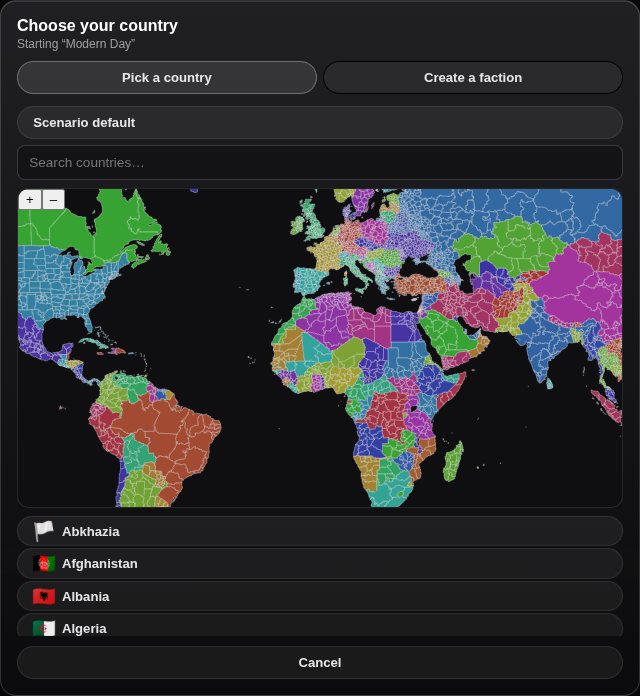 Pick a country, or switch to Create a faction to invent one.
A map and a searchable list of every country in the scenario. Click one on the map or pick it from the list — or press Scenario default to play whoever the scenario's author chose.
The list is built from the scenario's actual roster, which includes countries that hold no land — governments in exile, movements, organisations. Playing one of those is a very different game: you have no territory to defend and no territory to lose.
Create a faction
This is where you invent a country that does not exist. You give it:
- A name — this is its identity everywhere in the game, so choose it properly.
- A colour — how it paints on the map.
- A flag — optional; pick from the library or leave it blank.
- Lore — who this power is: its history, cause and ambitions. The world reads this. It is worth writing something real, because it steers the story the AI tells and how every other country treats you.
- Starting territory — Claim regions on the map, or Start landless.
The regions you take are carved out of whoever held them, and that country will notice.
Difficulty
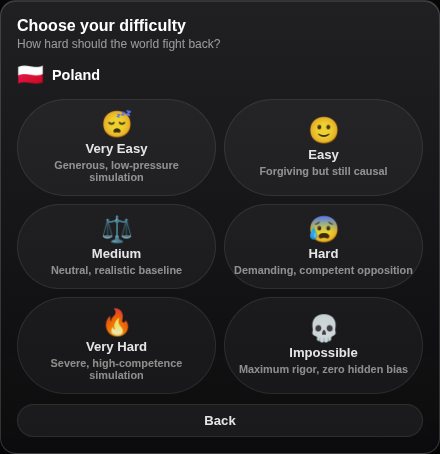 Six levels. Medium is the honest one.
Six levels. Difficulty does not give the AI secret information or extra resources, and at no level is the world biased against you — it changes how much benefit of the doubt your plans get, how competent your rivals are, how hard consequences press, and how firm other governments are at the table. It has its own instructions for the time skip, for diplomacy and for interactive events.
| Your plans | Rivals | Consequences | At the table | ||
|---|---|---|---|---|---|
| 😴 | Very Easy | Very generous reading | Relaxed | Low | Soft |
| 🙂 | Easy | Generous | Moderate | Low–medium | Flexible |
| ⚖️ | Medium | Neutral | Normal | Normal | Interest-based |
| 😰 | Hard | Little leeway | High | High | Firm |
| 🔥 | Very Hard | Almost none | Very high | Very high | Very firm |
| 💀 | Impossible | None | Elite | Maximum | Maximum |
At the easy end, when several outcomes are equally plausible the less punishing one is preferred — but no level grants a success the world state makes impossible. At the hard end, weak assumptions are punished and errors can compound naturally — but even Impossible is "full causal consequences", never a scripted conspiracy against you.
Medium — "the simulator neither helps nor targets the player" — is the honest one and the right default. The difference between Medium and Hard is mostly whether a vague order gets a charitable reading — on Hard, "improve the economy" will get you an event about a policy that did not work.
Difficulty is set when you start and stored with the game, but you can change it mid-campaign from the cheats panel.
Opening a campaign
Starting or resuming a game shows its scenario's cover, then a loading screen — the logo turning over a dark ground — while the map works out every country's surface. A pause here is normal rather than a hang; the map is revealed once it is drawn.
On a new game's first turn, a scenario with a World Before Round One briefing also writes its own backstory — the recent history that led to the situation you have inherited.
What gets created
Starting a game copies the scenario's world into a new playthrough and gives it its own set of documents — world state, game state, events, actions and chat history. From that point the game is independent: editing the scenario later does not touch it.
Games appear in the Games tab of the main menu, sorted by last played and most played, with your country, date, round, and pending actions and events on the card. Current opens it, Archive puts it away, and the card's ⋮ holds Edit, Clone and Export. See saves and rollback.
Starting well
- Take a country you know something about. You will write better orders for a situation you can already picture.
- Modern Day first. It is the most polished and the most legible.
- Medium first. Very Hard is not more interesting on turn one, just less forgiving.
- Write the faction lore if you invent a country. A faction with no lore is a blank to the world, and it will be treated like one.
Next
- Your first campaign — a walkthrough of the first hour.
- The interface — what everything on screen is.
- Countries and identity — names, tags, flags and reputation in depth.
Open Historia is under active development on two channels, and this
wiki is written by hand — a page can fall behind a release. Last checked against the game on 2026-09-24 · main e62a1c55 · beta 2f48a6c2. If something
here does not match what you see in the game, trust the game and
say so on Discord.