 Open Historia
Time and Turns
Nothing happens until you skip time. Jump lengths, what a skip costs, Intervene, and undoing a turn that went badly.
Open Historia has no tick. There is no clock running in the background, nothing accumulates while you think, and no timer forces your hand. The world advances only when you press the button, and only as far as you tell it to.
Open the time panel with » on the date pill, top right.
Fixed jumps
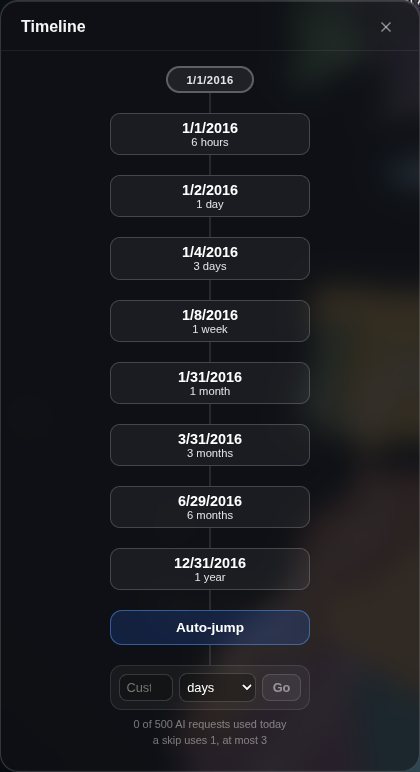 Each preset shows the date you will land on; the custom row and today's AI request count sit underneath.
| Jump | Days |
|---|---|
| 6 hours | 0.25 |
| 1 day | 1 |
| 3 days | 3 |
| 1 week | 7 |
| 1 month | 30 |
| 3 months | 90 |
| 6 months | 180 |
| 1 year | 365 |
Each one shows the date you will land on, so you can see what you are committing to — and it is the date the jump actually reaches, worked out by the same rule the jump uses.
Note that a "month" is a flat 30 days and a "year" is 365 — the game does not track calendar month lengths for jump sizing. So from 1 January, 1 month lands on 31 January, not 1 February, and the button says so.
Custom jumps
Type an amount and pick a unit: hours, days, weeks, months or years. The conversions are the same flat ones — an hour is 1/24 of a day, a week is 7, a month is 30, a year is 365.
The row shows Lands on with the resulting date before you press Go, the same way the presets do. A part-day amount is rounded to whole days, so a 12-hour skip moves the date to tomorrow.
Useful when you want to land on a specific date, or when a fixed preset is slightly wrong for what is happening.
Auto-jump
Instead of choosing a distance, let the model choose it. Auto-jump looks at the state of the world and skips to the next moment it thinks you would want to be present for — which might be three days if a crisis is breaking, or eight months if nothing is happening.
Good for quiet stretches. Less good when you have something specific in motion that you want to watch closely.
How far should I skip?
The world has to fit everything that happens into one turn's worth of events. Skip a year and twelve months get compressed into a handful of paragraphs; skip a week and you get the texture.
- Something is actively unfolding — a war opening, an ultimatum running out, a coup — 6 hours to 3 days.
- Normal play — 1 week to 1 month. This is where most campaigns live.
- Building toward something — 3 to 6 months.
- Nothing needs you — 1 year, or auto-jump.
A common early mistake is skipping a year on turn one and wondering why the campaign feels thin. Start with months.
What a skip costs
Under the presets the panel shows today's count — "0 of 500 AI requests used today · a skip uses 1, at most 3". With Save AI requests on (the default), a skip is one request, a second when there is something to check afterwards — units to move, fronts to redraw, the Projects board, your agents' reports, all in one — and never more than three. Turn it off in Settings → AI for the most thorough turns on a key with no daily limit. See settings.
While it runs
A time skip takes a while — the model is simulating the world. The time panel says what it is doing as it goes ("Writing 1 month of events…", "Moving the armies, redrawing the fronts…"), and there is a Cancel button. Cancelling aborts the request cleanly and leaves the world exactly as it was.
The Events panel opens as soon as the skip starts and fills as the model writes, so you can start reading before it finishes (Gemini delivers the whole answer at once, so there it all arrives together). Turn this off with Show time skip events as they are written in Settings → AI.
If jumps routinely hang, turn on Limit AI generation in Settings → AI. It gives up on a stalled generation and falls back to a canned event rather than waiting indefinitely. It watches for silence rather than total elapsed time, so a slow-but-working model is not cut off mid-answer.
Long skips in segments
Settings → AI → "Generate long time skips in segments", off by default.
Off, the whole skip is generated in one request. On, a skip of 120 days or more is generated as several requests of about three months each, merged into one round — a year is four. The result still arrives as a single turn with one set of events; you are not asked anything in between.
The trade:
| Off (default) | On | |
|---|---|---|
| Requests per skip | One | One per segment |
| Token cost | Lower | Higher — the prompt is re-sent per segment |
| Timeouts on long skips | More likely | Far less likely |
| How the turn reads | More like one continuous stretch | Slightly more episodic |
Turn it on if long skips keep failing or timing out, which is the usual symptom on a hosted provider that drops long requests. Leave it off otherwise: it costs more tokens, and a year generated in one pass hangs together better than one generated in pieces.
It only affects long skips — a week or a month is a single request either way — and never auto-jump, which has no span to divide up front. Each segment adds one request to the skip's cap.
Each segment is validated against the world as the previous segments left it, so the pieces cannot contradict each other — a war started in the first segment is real by the second. If one segment fails, the turn is held rather than lost: Retry re-runs only that segment, and Discard drops the turn. See troubleshooting.
Intervene
Events are revealed one at a time, and three events in you may see the thing you would have acted on — an ultimatum, a border crossing — while the events after it assume you did nothing. ✋ Intervene here, under Next event and Skip to end in the Events panel, stops the round at the event you are looking at. It asks once, then:
- the events you have seen are kept;
- the rest are discarded — they never happen;
- the date becomes the last kept event's;
- the next skip is told where you stopped, so it does not write the discarded events again.
It costs no request, and the shortened turn can still be undone. It is offered only while events remain unrevealed.
Interactive events
Now and then a skip offers one of its own weightier events about you to play out — a one in three chance when it has such an event, and never within three turns of the last offer: its card carries a yellow ⚡ strip, and the time panel mentions the offer until the next skip replaces it. See interactive events.
Time stands still while one is in progress. The skip controls are replaced by a note that leads back to the scene; end it or set it aside to carry on.
Undo
↩ Undo last turn is in the time panel, and it tells you how many turns can be undone.
Undo restores the world, the game state, the events, your action queue, the chat history and the colours to exactly how they were before that jump. The game keeps up to 12 turns of snapshots, so you can step back repeatedly.
Use it freely. A time skip is partly a roll of the dice, and rewinding a turn that produced something absurd is how the game is meant to be played, not a workaround.
For jumping back further than the recent stack, the cheats panel has a roll back turn tool that restores the start of any earlier turn — discarding everything after it.
Rounds and dates
Every jump increments the round counter, which starts at 1. The round is what the game uses internally to seed deterministic outcomes such as espionage rolls and combat, which is why the same save always replays the same way.
The date is stored as plain text, so scenarios can use non-Gregorian dates such as "Third Age 3019" without the clock breaking. Loosely formatted dates get repaired rather than rejected.
BC dates are real dates. A year before AD 1 is written with a leading minus and counts
backwards with no year zero: -0218-03-01 is 1 March 218 BC. Jumps, the timeline, the war and
treaty records and the stat history all do proper arithmetic across the boundary, and the date is
shown as "3/1/218 BC". Prose dates still pass through untouched.
Player focus
Beta channel only.
How much of each skip is about your country is a choice, made per game in Settings → AI → Player focus — for this game. A scenario sets where new games start; the default is Balanced.
| Level | At least this much of each skip is about you |
|---|---|
| World first | A quarter, when you have something going on; the rest of the world gets the room. |
| Balanced | 40%, when you have orders, Projects or open threads. |
| Focused | 60%, and other powers' plans take up less of what the AI is shown. |
| Spotlight | Three quarters, with the wider world kept to what matters most. |
It never invents events for you: in a quiet stretch the world fills the skip as usual, and what you have going on — orders, milestones due, wars, open threads — is what the share is measured against.
The first turn is special
On round 1, a scenario that has a World Before Round One briefing generates its own backstory before play begins — the recent history that led to the situation you have inherited. It happens once, and it gives the world something to refer back to.
Next
- Events and history — reading what a jump produced.
- Giving orders — what to queue before you jump.
- Saves and rollback — how snapshots and autosave actually work.
Open Historia is under active development on two channels, and this
wiki is written by hand — a page can fall behind a release. Last checked against the game on 2026-09-24 · main e62a1c55 · beta 2f48a6c2. If something
here does not match what you see in the game, trust the game and
say so on Discord.