 Open Historia
The World Map
Reading the map: political fills, striped disputes, labels, the 3D globe, terrain and basemaps.
The map is the game's main display and its main control. Everything on it is clickable, and the way it is coloured tells you who holds what.
Political fills
Each country is drawn as one surface in the colour of whoever administers it, with its frontiers stitched between neighbours, rather than as a patchwork of separately filled regions. The fill strengthens as you zoom in — about 46% with the whole world in view, 72% at regional zoom and 84% close in — so relief and seas read from far out and ownership reads clearly up close.
A campaign opens under a loading screen, the logo turning over a dark ground, while the map works out every country's surface. That pause is normal, not a hang; the map is revealed once it is drawn. Switching the 3D globe on or off shows the same screen while the map redraws.
Colours are resolved in a fixed order: the scenario's own palette first, then any colour set on the country, then a match against known aliases, and finally a colour derived from the country's name. That last fallback is why an invented faction always gets a colour even if you never picked one — and why two countries occasionally land on similar shades.
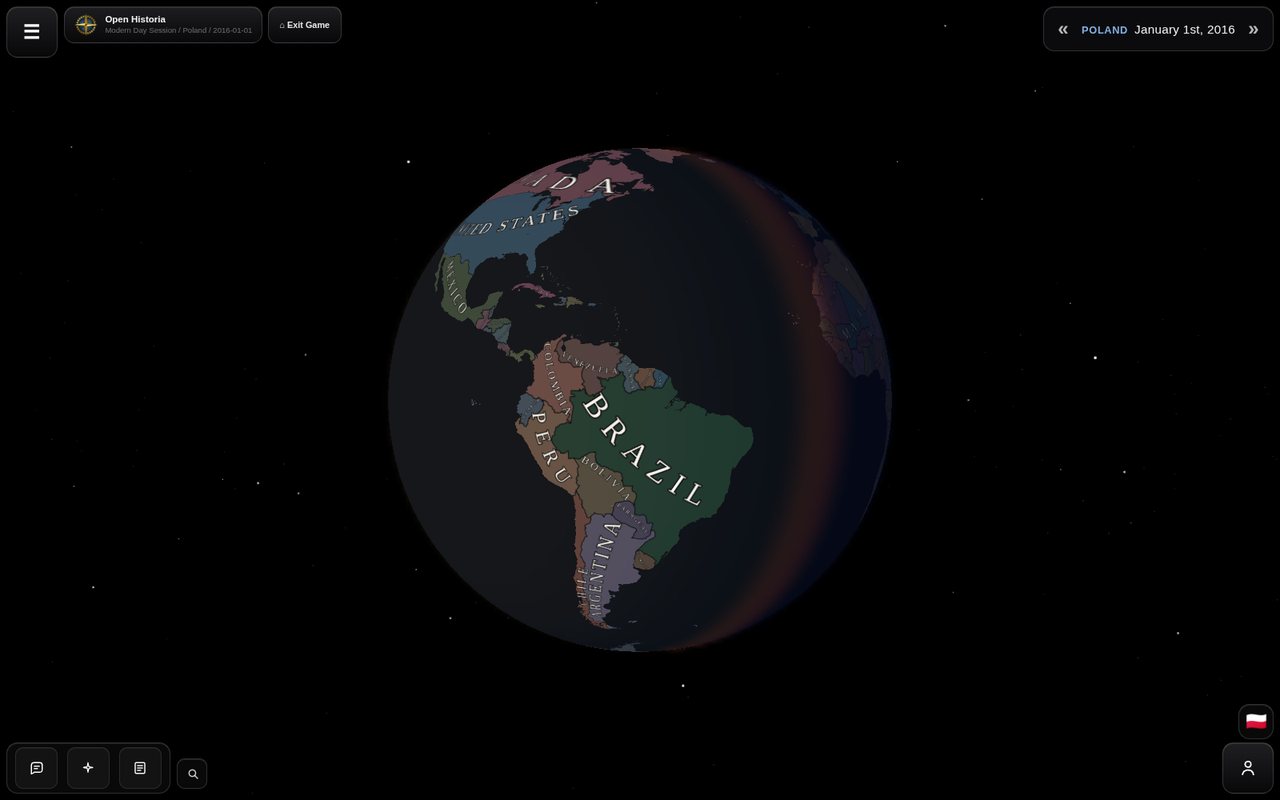 The globe, with the real day/night terminator falling across the Atlantic and the starfield behind it.
Striped regions mean a dispute
A region rendered in stripes is claimed by more than one country. The stripes combine the colour of whoever actually administers it with the colours of the claimants.
This is a real mechanic, not decoration — see territory for the difference between holding ground and being acknowledged as its owner.
Labels
Each country gets one label: curved along its territory where it fits, a straight one where it does not, placed so compact countries read horizontally and long ones follow their length. Detached land of consequence — Alaska, Kalimantan, Greenland — carries its owner's name as well. Labels use the name the scenario gives the country, so a renamed country is labelled by its new name. They scale with the map and fade out by zoom 7.5, once the provinces read on their own. Cities appear from about zoom 3.4 and get more numerous as you go in.
Scenario authors can set the label font, letter colour and border colour for their world, so a custom map may look quite different from Modern Day.
You can turn country labels off, or override the label font, in Settings → Map.
Zoom and bounds
The camera runs from zoom 2.25 (the whole world) to 16 (street level, where the basemap supports it). Vertical panning is bounded at roughly 80°S to 85°N — there is no reason to fly off the top of the map.
Basemaps
The imagery under the political fills. Settings → Map → Basemap starts on Scenario default — whatever the scenario's author chose, which for Modern Day is Ocean — and offers fourteen others:
| Atlas Relief | Bathymetry and shaded land relief, graded as a political canvas |
| Atlas Relief - Dark | The same, darker |
| Satellite | Photographic imagery |
| Streets | Roads and place names |
| Topographic | Contours and relief |
| Terrain | Physical terrain base |
| Shaded Relief | Hillshading only |
| Physical | Natural-earth style |
| National Geographic | Atlas styling |
| National Geographic - Dark | Atlas styling, darkened, without political or place labels |
| Ocean | Bathymetry and a muted land base |
| Ocean - Dark | The same, darker |
| Light Gray Canvas | Minimal, light |
| Dark Gray Canvas | Minimal, dark |
Your choice is stored per browser and overrides the scenario's; it applies immediately. Setting it back to Scenario default hands control back to the scenario.
Not every basemap has imagery at every zoom — Physical stops at zoom 8, Terrain and Shaded Relief at 13. Past that the game upscales the last available tiles rather than showing nothing.
The 3D globe
Settings → Map → 3D Globe swaps the flat projection for a sphere.
It is not just a projection change. The globe carries a real day/night terminator computed from the actual subsolar point, a starfield, and a sun sprite — the lighting corresponds to the real world clock, refreshed every minute. Left alone, the globe rotates slowly, a full turn every ten minutes.
Both the idle rotation and the general motion can be switched off — Disable idle globe rotation, or Reduce motion as an umbrella setting.
3D terrain
Settings → Map → 3D Terrain, marked experimental and honestly so. It raises real elevation with a heavy 15× exaggeration so that mountain ranges actually read at world scale, plus light hillshading. A scenario with a custom background has no elevation data to raise, so it stays off there.
Custom backgrounds
A scenario can replace Earth entirely, either with an image pinned to a geographic extent or with its own vector artwork. This is how fantasy maps work: the political layer sits on top of a world that has nothing to do with this planet.
Clicking things
| Click | You get |
|---|---|
| A region | A card naming the country and the region, with 💬 to open a chat, ⧉ to copy the name and ⓘ to open the country's panel. |
| A country's panel | Flag, details, alternative names, related events filtered by importance, and an AI report on request. |
| A unit | An intelligence card — what the formation is, whose, how strong, what it appears to be doing. Not a command panel. |
| A city or structure | Name, population, whether it is a capital, and what kind of thing it is. |
Performance
If the map is slow:
- Turn off 3D terrain. It is the most expensive thing on the list by a wide margin.
- Turn off the globe. The flat map is cheaper.
- Reduce motion, which quiets several animations at once.
- Zoom out. Fewer tiles, fewer labels.
The map caches a bounded number of tiles deliberately, to avoid running a browser tab out of memory on a long campaign.
Next
- Territory — what the stripes actually mean.
- Cities and structures — the things drawn on top.
- Settings — every map option in one place.
Open Historia is under active development on two channels, and this
wiki is written by hand — a page can fall behind a release. Last checked against the game on 2026-09-24 · main e62a1c55 · beta 2f48a6c2. If something
here does not match what you see in the game, trust the game and
say so on Discord.